Native 4K vs. Pixel-Shifting: Is Your Projector Really 4K?
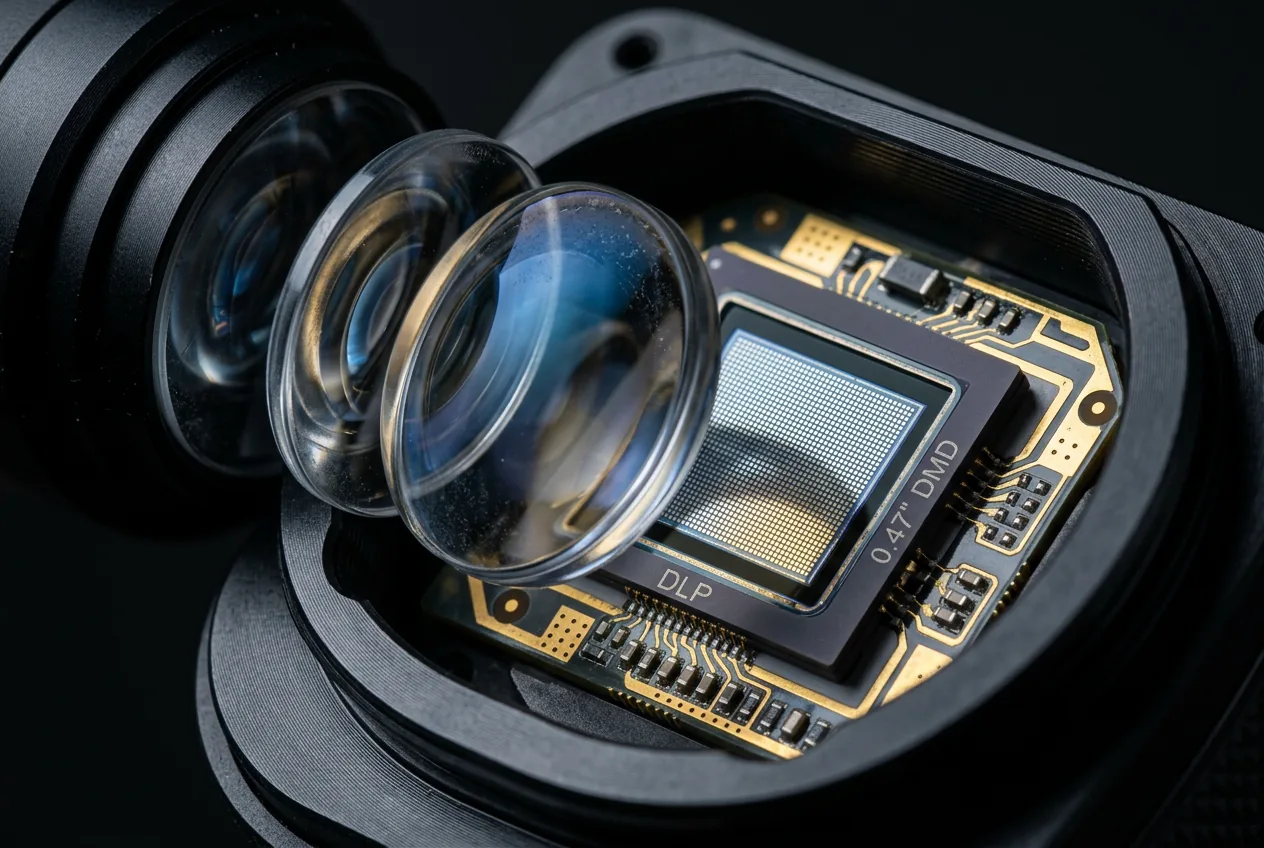
"4K" on a projector listing doesn't always mean what it means on a TV. Some projectors have a genuine 3840x2160 imaging chip. Others reach 4K-equivalent detail by rapidly shifting a lower-resolution chip. Both get called "4K" in Amazon titles.
The short answer
Native 4K means the projector's imaging chip physically contains 3,840 by 2,160 individual pixels, the full 8.3-million-pixel grid is there in hardware. Pixel-shifting (also called XPR or e-shift, depending on the manufacturer) uses a lower-resolution chip and shifts it diagonally between frames, displaying two or four sub-frames so fast the eye perceives a denser image than the chip's actual pixel count. Both display an image built from a 3840x2160 signal, the difference is in how the hardware produces it.
How pixel-shifting actually works
The most common implementation, DLP with XPR, places an optical actuator, a small piece of machined glass paired with electromagnetic coils, between the imaging chip (called a DMD, or digital micromirror device) and the projector's lens. As the actuator rapidly tilts the glass, it shifts where the chip's image lands on screen by a fraction of a pixel, while the chip simultaneously displays new image data for that shifted position. Two or four of these sub-frames, each landing at a slightly different position, combine into one perceived frame. A common 0.47-inch DMD chip is natively 1920x1080, shifted four ways to land 3840x2160 worth of distinct pixel positions on screen, a larger 0.66-inch chip natively 2716x1528 needs to shift only two ways to reach the same result, which is one reason some "4K" projectors look sharper than others despite both being pixel-shifted rather than native. See Sound & Vision's technical breakdown of DLP's 4K implementation and ProjectorCentral's resolution shootout for a side-by-side look at how this compares to native panels in practice.
This is also why the "4K" label is legally defensible even on a pixel-shifted projector. The Consumer Technology Association's 4K UHD terminology standard defines "4K UHD" as a display capable of showing at least 8.3 million addressable pixels (3840 horizontal by 2160 vertical), a bar about the final image on screen, not a requirement that the imaging chip itself be built with that many physical pixels. Both native and well-executed pixel-shifted projectors can legitimately meet it.
Why this doesn't show up reliably in a product title
Pulling technical specs for this site's full catalog, title text alone was not a reliable signal for confirming genuine 4K resolution, some listings claiming "4K" in the title didn't have native_resolution data supporting 3840x2160 when we checked the listing's actual technical specifications. That's why every product this site lists is verified against its stated native resolution field, not just title text, before being tagged as a 4K listing at all. A title claim is marketing copy, a technical spec field is closer to what actually ships.
Does it matter which one you buy?
For most viewers, at normal seating distance, well-implemented pixel-shifting looks close to native 4K, the perceptual difference is smaller than the spec-sheet difference suggests. Where it matters more:
| Use case | Why native resolution matters more here |
|---|---|
| Very large screens (120"+) | Pixel structure and shift artifacts become more visible at scale |
| Close seating distance | Fine detail differences are easier to spot up close |
| Text-heavy content, presentations | Fine text edges show pixel-shifting artifacts more than video content does |
| Casual movie/streaming viewing at normal distance | Difference is often not perceptible in practice |
How to actually check before buying
Look for a specific chip resolution in the spec sheet, such as "3840x2160 native" or an explicit statement of the imaging chip's pixel count. Terms like "4K UHD input support," "4K compatible," or "supports 4K signals" describe what the projector can receive and display, not necessarily what its chip natively renders, don't read those as confirmation of native resolution. If the spec sheet doesn't state a native chip resolution directly, treat it as unconfirmed rather than assuming the best case.
Frequently asked questions
What is the difference between native 4K and pixel-shifting projectors?
Native 4K has the full 3840x2160 pixel grid physically on the chip. Pixel-shifting uses a lower-resolution chip shifted rapidly between positions to approximate the same detail.
Can you tell native 4K from pixel-shifting by reading a product title?
Not reliably, titles use "4K" for both. Check the listing's stated native resolution or imaging chip specification instead.
Is pixel-shifting "fake 4K"?
It's a real, established display technology, not a marketing trick, it genuinely displays a full 3840x2160 signal. It's a different hardware approach from native 4K, not a lesser one in every practical sense, the visible difference depends heavily on screen size and viewing distance.
How does pixel-shifting actually work mechanically?
An optical actuator between the imaging chip and lens rapidly shifts the projected image by a fraction of a pixel while the chip displays new data for each position, combining two or four sub-frames into one perceived frame.
Is CTA 4K UHD the same as native 4K?
Not necessarily. CTA's standard requires 8.3 million addressable pixels on screen, which both native chips and well-implemented pixel-shifting can deliver, it doesn't require the physical chip to be native 3840x2160.